
ai assistant
How an AI Assistant Can Eliminate Repetitive Team Work

Don Yagger
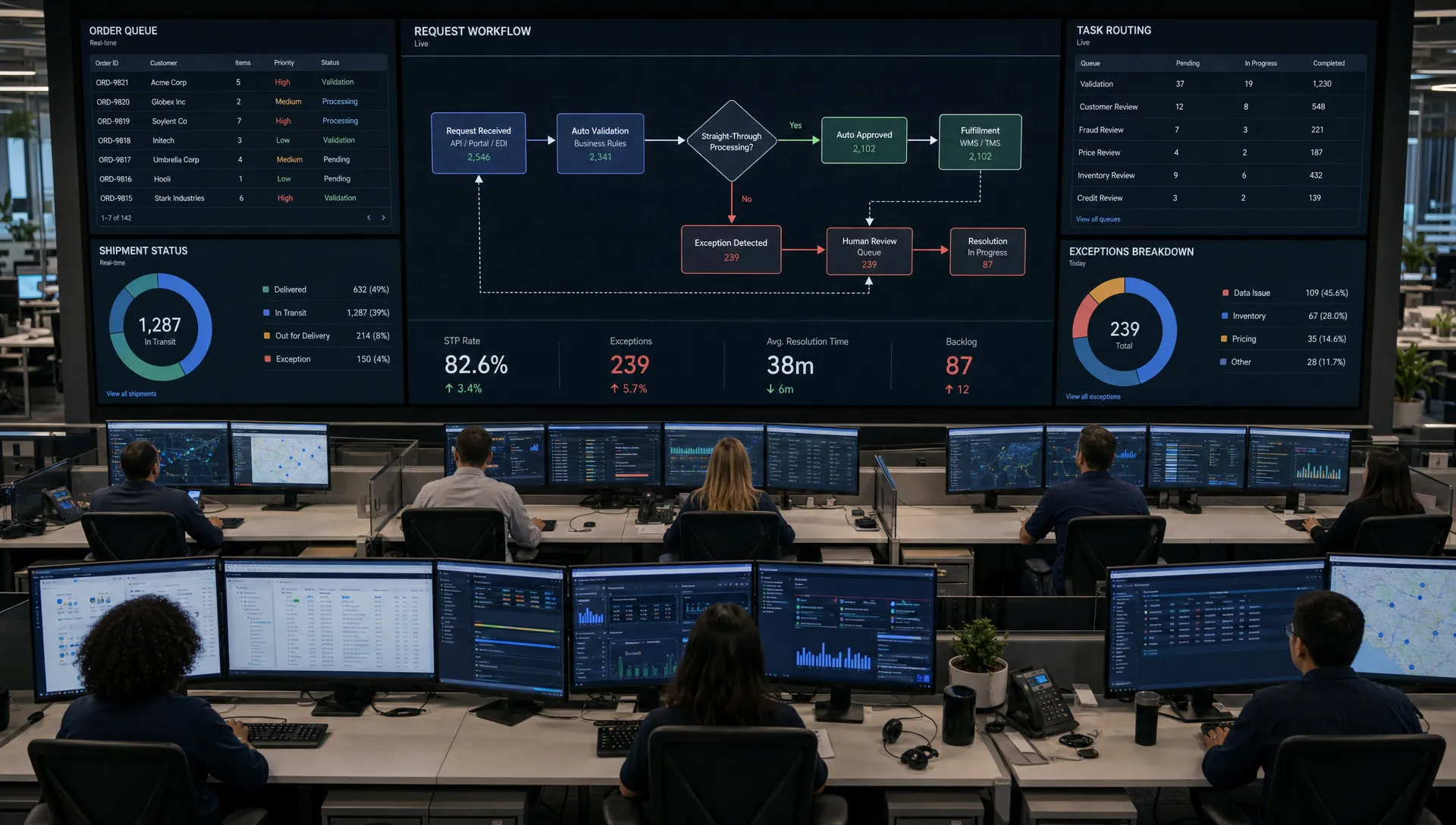
Every growing team eventually creates an invisible factory of microtasks. Someone copies a customer request into a spreadsheet. Someone else checks a portal, rewrites the same status update, tags a colleague, sends a reminder, and updates a CRM. None of these tasks feels difficult, but together they drain focus from the work that actually moves the business forward.
An AI assistant can remove much of that repetitive team work, but only when it is designed as an operational system, not as a novelty chatbot. The goal is not to replace expertise. The goal is to give skilled people a reliable digital teammate that can read context, pull live data, follow rules, take routine actions, and escalate anything uncertain.
For logistics, service, sales, finance, and operations teams, that shift can be significant. Instead of asking people to spend their day between inboxes, spreadsheets, CRMs, internal portals, and reporting tools, an AI assistant can coordinate the repeatable parts of the workflow and keep humans in control of decisions that require judgment.
What an AI assistant really means in a team workflow
A basic chatbot answers questions. A production-ready AI assistant does more. It is connected to the tools and data a team already uses, understands the boundaries of its role, and can execute approved actions.
In practice, that can mean an assistant that monitors an inbox, classifies incoming requests, checks an order management system, drafts a customer update, creates a task for a colleague, and logs the outcome. It can also mean a voice agent that handles routine phone requests, a chatbot for internal knowledge, or a custom agent that prepares reports from live operational data.
The important distinction is this: an AI assistant should sit inside the workflow, not beside it. If employees still need to copy the assistant’s answer into another system, the repetitive work has only moved location. Real efficiency comes when the assistant can work with permissions, integrations, business rules, and a clear escalation path.
Why repetitive team work survives for so long
Most repetitive work is not repetitive because teams are careless. It exists because modern business systems are fragmented. Information arrives in one place, decisions happen in another, and records must be updated somewhere else.
A logistics coordinator might check shipment information in one portal, reply to a customer in email, update a transport management system, and notify an account manager in chat. A sales team might summarize call notes, update CRM fields, schedule follow-ups, and create internal reminders. A support team might answer the same pricing, delivery, onboarding, or troubleshooting questions every day.
These tasks survive because they require just enough context to be hard for traditional automation. A rigid script can move data from field A to field B, but it struggles when the wording changes, an attachment is missing, or a customer asks two questions in one message. AI assistants are useful because they can handle natural language, semi-structured information, and routine judgment within defined limits.
The productivity opportunity is large. McKinsey’s research on generative AI estimates that current generative AI and related technologies could automate work activities that absorb 60 to 70 percent of employees’ time today. That does not mean every task should be automated. It means teams should look closely at where valuable people are being used as routers, rewriters, checkers, and data movers.
How an AI assistant eliminates repetitive work
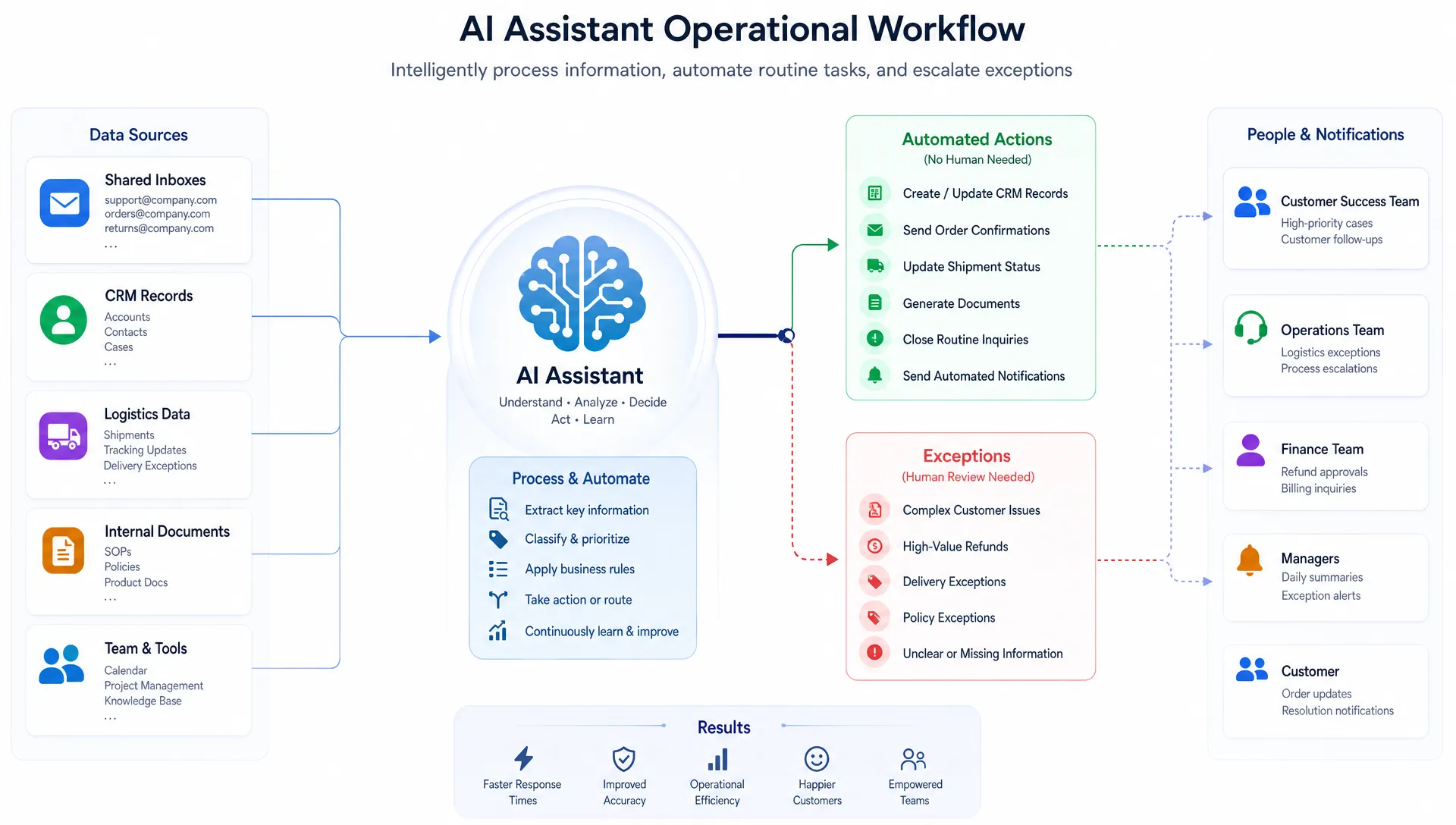
An effective AI assistant removes repetition by taking over the loop around a task. It does not simply generate text. It observes a trigger, understands context, retrieves relevant data, performs an approved action, and records what happened.
| Workflow stage | What the assistant does | Example |
|---|---|---|
| Trigger | Detects a new event or request | A customer email arrives asking for delivery status |
| Understand | Classifies intent and extracts key details | Identifies order number, urgency, language, and request type |
| Retrieve | Pulls live information from approved systems | Checks current shipment status and latest ETA |
| Act | Completes a predefined routine step | Drafts or sends a status update based on company rules |
| Escalate | Hands off uncertain or sensitive cases | Flags missing data or angry customer tone for a human |
| Record | Updates systems and creates an audit trail | Logs the interaction in the CRM or internal portal |
This loop is where the time savings happen. Employees no longer have to open five systems to answer a standard request. They review exceptions, approve sensitive actions, and focus on work that needs human experience.
Repetitive tasks that are good candidates for an AI assistant
The best first use cases are frequent, rule-based, and measurable. They should have enough volume to matter, but not so much risk that automation creates unnecessary exposure.
| Team area | Repetitive work to reduce | What an AI assistant can do |
|---|---|---|
| Operations | Status checks, handoff messages, exception routing | Monitor requests, retrieve live data, notify the right person |
| Logistics | Shipment updates, ETA questions, delivery issue triage | Check connected systems and prepare customer-ready responses |
| Sales | CRM updates, call summaries, follow-up reminders | Summarize notes, populate fields, draft next-step emails |
| Customer service | Repeated questions, ticket classification, knowledge lookup | Answer approved questions and route complex cases |
| Finance and admin | Invoice checks, document matching, recurring reports | Extract information, compare records, prepare review queues |
| Management | Weekly updates, KPI summaries, internal reporting | Pull data from sources and create consistent summaries |
A good rule of thumb is to start where people say, “I know exactly what to do, but it takes too long because I have to do it every time.” That sentence usually points to an excellent AI assistant workflow.
What changes for the team day to day
The biggest impact is usually not one dramatic automation. It is the removal of hundreds of small interruptions.
When an AI assistant handles routine status updates, team members do not need to stop deep work every few minutes to answer the same request. When it summarizes meetings or calls, people spend less time reconstructing what happened. When it prepares internal reports, managers spend less time collecting data and more time interpreting it.
The team also gains consistency. Repetitive work often varies by person, workload, and time pressure. An assistant can apply the same classification logic, tone guidelines, routing rules, and documentation requirements every time. That consistency is especially valuable in customer-facing and operational environments where small errors create downstream delays.
There is also a morale benefit. Repetitive work is rarely the reason someone joined a company. Removing low-value admin helps people spend more time on planning, customer relationships, problem-solving, and improvement work.
The building blocks of a production-ready AI assistant
An AI assistant that eliminates repetitive team work needs more than a good prompt. It needs the same discipline as any operational software system.
- Live data integration allows the assistant to work with current information from CRMs, portals, databases, spreadsheets, inboxes, and internal tools.
- Workflow rules define what the assistant can do automatically, what needs approval, and what must always be escalated.
- Permissions and access control prevent the assistant from seeing or changing information outside its role.
- Human-in-the-loop review gives teams a safe way to approve, correct, or reject outputs before full automation.
- Logging and documentation make actions traceable, which is essential for maintenance, compliance, and trust.
- Ongoing monitoring helps improve accuracy, update prompts and rules, and adapt the assistant as processes change.
This is where operational AI differs from experimentation. A demo can impress in a meeting. A useful assistant has to survive real users, messy data, edge cases, changing priorities, and production workloads.
For companies that need this kind of system, Gloura builds operational AI and custom software with live data integration, workflow automation, custom AI agents, internal tools, and handover documentation.
How to roll out an AI assistant without disrupting the team
The safest path is to start narrow, prove value, and expand from there. A focused assistant for one repeated workflow is easier to test, govern, and improve than a broad “do everything” assistant.
- Map the repetitive loop by documenting the trigger, inputs, decisions, systems, outputs, and exceptions.
- Choose one measurable use case where the team can clearly track time saved, response speed, accuracy, or backlog reduction.
- Define the assistant’s authority so everyone knows which actions are automatic, which require approval, and which are forbidden.
- Connect only the systems needed for the first workflow instead of trying to integrate every tool on day one.
- Run a supervised pilot where the assistant drafts, classifies, or prepares actions while humans review the output.
- Improve based on real usage by studying corrections, failed cases, user feedback, and missing data.
- Expand gradually once the workflow is stable, documented, and trusted by the people who use it.
This approach turns AI adoption into an operational improvement project rather than a vague innovation initiative. It also gives the team a chance to shape the assistant around how work actually happens.
Guardrails matter as much as automation
An AI assistant should not be allowed to improvise in areas where mistakes are costly. Guardrails are what make the difference between a helpful operational tool and an unreliable automation risk.
The NIST AI Risk Management Framework emphasizes governance, mapping, measurement, and management of AI risk. For business teams, that translates into practical controls: define allowed actions, limit access, test outputs, monitor performance, and keep humans responsible for high-impact decisions.
For teams in the EU and DACH region, data handling is especially important. An assistant may process customer emails, order data, contracts, invoices, or employee information. Businesses should consider GDPR obligations, data residency, access permissions, retention rules, and whether the use case falls under emerging AI regulation. The European Commission’s overview of the EU AI Act regulatory framework is a useful starting point for understanding the direction of AI governance in Europe.
Gloura is based in Vienna and builds on EU servers for the DACH region, which can be relevant for companies that want operational AI while keeping infrastructure choices aligned with European requirements.
When an AI assistant should not automate the work
Not every repetitive task should disappear. Some work is repetitive because it involves accountability, judgment, or sensitive context. In those cases, the assistant should support the human rather than act independently.
Examples include final approval of legal terms, high-value financial decisions, complex HR matters, safety-critical operational choices, and customer situations where relationship nuance matters. The assistant can still prepare summaries, gather evidence, identify missing information, or draft options. The human should remain the decision-maker.
It is also unwise to automate a broken process before improving it. If a workflow has unclear ownership, inconsistent rules, or unreliable data, AI may only speed up confusion. The best results come when the process is simplified first, then assisted.
Measuring whether the AI assistant is working
The value of an AI assistant should be visible in operational metrics, not just user enthusiasm. Before the pilot begins, define what success looks like.
| Metric | What it shows | Example target |
|---|---|---|
| Time per task | Whether manual effort is falling | Reduce average handling time for routine requests |
| Response speed | Whether customers or internal teams get answers faster | Shorten first response time for standard questions |
| Backlog volume | Whether repetitive work is being cleared | Reduce open low-complexity tickets |
| Error or rework rate | Whether quality is improving or declining | Track corrections needed after assistant output |
| Escalation rate | Whether the assistant understands its limits | Monitor how often cases require human review |
| Employee adoption | Whether the tool fits real workflows | Measure recurring usage and qualitative feedback |
The most useful metric is often hours returned to the team. If an assistant saves ten people 30 minutes a day, that is more than 100 hours a month available for higher-value work.
Beyond operations: AI assistants for specialized workflows
Although operational tasks are often the easiest place to start, AI assistants can also support specialized work. They can help technical teams triage bugs, help marketing teams organize content workflows, help leadership teams prepare recurring analysis, and help SEO teams monitor structured tasks that repeat across pages.
For companies thinking about search visibility in an AI-driven landscape, Gloura has also covered why AI SEO and GEO are changing online visibility. The same principle applies: the best AI systems are not generic. They are built around a specific business outcome, connected to the right data, and maintained as the environment changes.
Frequently Asked Questions
Can an AI assistant replace a full team? In most business settings, the better goal is to replace repetitive task loops, not people. A well-designed assistant handles routine work while humans manage exceptions, relationships, strategy, and decisions that require accountability.
What kind of repetitive team work should we automate first? Start with high-volume workflows that follow clear rules, use accessible data, and create measurable delays. Common examples include ticket triage, CRM updates, customer status replies, document extraction, and recurring internal reports.
Do we need perfect data before building an AI assistant? No, but you do need to understand where the reliable data lives and where gaps occur. A good rollout can include human review for uncertain cases while improving data quality over time.
How long does it take to see value from an AI assistant? A narrow pilot can often show value quickly when the workflow is well defined and the needed systems are accessible. Broader automation usually takes longer because it requires integrations, permissions, testing, training, and maintenance.
Is an AI assistant safe for customer or operational data? It can be, but safety depends on the architecture. Teams should use clear access controls, logging, data protection practices, human review for sensitive actions, and infrastructure choices aligned with their compliance needs.
Turn repetitive work into an operational AI workflow
Repetitive team work does not disappear because a company buys an AI tool. It disappears when the workflow is understood, the assistant is connected to live data, and the system is built with rules, guardrails, and maintenance in mind.
If your team is losing time to repeated inbox checks, status updates, CRM admin, internal reporting, or manual handoffs, Gloura can help identify the right AI assistant use case and build production-ready operational AI around it. From discovery calls and consulting to custom AI agents, workflow automation, software development, documentation, and ongoing maintenance, the focus is simple: make AI useful in the day-to-day work your team already does.